The Complete Guide to Phishing-Resistant MFA — FIDO2, Passkeys and Hardware Keys Explained
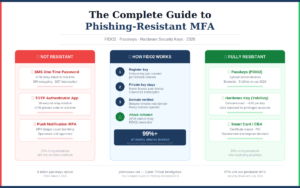
Multi-factor authentication was supposed to be the answer to credential phishing. For years, security teams deployed MFA across their organisations and ticked the box with confidence. Then adversary-in-the-middle attacks arrived at scale — and the uncomfortable truth became unavoidable: most MFA is not phishing-resistant.
The distinction matters enormously. <cite index=”1-1″>Phishing-resistant MFA blocks more than 99% of identity-based attacks even when the attacker already has a valid username and password</cite>, according to the Microsoft Digital Defense Report 2025. But that statistic applies only to phishing-resistant MFA — not to the SMS codes, push notifications, and authenticator app TOTP codes that the majority of organisations currently rely on.
This guide explains the difference, breaks down every authentication method available in 2026, and tells you exactly how to deploy phishing-resistant MFA in your organisation.
Why Most MFA Can Still Be Phished
To understand why phishing-resistant MFA matters, you need to understand how MFA gets bypassed in practice.
The AiTM Problem
Adversary-in-the-Middle (AiTM) phishing tools — Evilginx3, Tycoon2FA, Modlishka — work by positioning a reverse proxy server between the victim and the legitimate website. When a victim visits an AiTM phishing page:
- They enter their username and password — captured by the proxy
- The proxy relays this to the real website, which prompts for MFA
- The MFA prompt is relayed back to the victim — an SMS code, a TOTP code, or a push notification
- The victim completes MFA — the proxy relays the response
- The real website issues a session cookie — the proxy intercepts it
- The attacker is now authenticated, MFA bypassed entirely
The critical insight: SMS codes, TOTP codes from authenticator apps, and MFA push notifications are all vulnerable to AiTM attacks because they are time-limited codes that can be captured and relayed in real time. The authentication method proves the user received the code — but it cannot prove the user is on the legitimate website rather than an attacker’s proxy.
The MFA Fatigue Problem
A second bypass technique — MFA fatigue, also called push bombing — requires no technical proxy infrastructure at all. The attacker simply uses stolen credentials to trigger repeated MFA push notifications to the victim’s phone until the victim approves one, either accidentally or out of frustration.
This technique was used in the 2022 Uber breach. A contractor received repeated push notifications at 1am until they approved one. The entire Uber internal network was compromised without a single piece of malware.
The SIM Swap Problem
SMS-based MFA has an additional vulnerability: SIM swapping. An attacker who convinces a mobile carrier to transfer the victim’s phone number to an attacker-controlled SIM receives all SMS messages intended for the victim — including MFA codes. SIM swapping attacks have been used to drain cryptocurrency wallets, compromise email accounts, and bypass banking authentication.
The MFA Hierarchy — From Weakest to Strongest
Not all MFA is equal. Here is every authentication method ranked from most to least phishable:
❌ SMS One-Time Passwords (OTP) — Weakest
SMS OTP sends a time-limited code to the user’s mobile number. It is vulnerable to:
- AiTM relay attacks (code captured and used in real time)
- SIM swapping (attacker controls the phone number)
- SS7 network attacks (interception at the carrier network level)
- Social engineering (calling the carrier to redirect the number)
The UAE Central Bank mandated an end to SMS-OTP by March 2026 to combat fraud — a regulatory signal about where the industry is headed. SMS OTP should be considered a legacy method and migrated away from as a priority.
Verdict: Do not use for anything sensitive.
❌ Email OTP — Weak
One-time codes sent to email. Vulnerable to AiTM relay and to email account compromise (which is frequently the goal of the phishing attack in the first place). Using email OTP for email account security is circular — if the attacker has your email, they have your OTP.
Verdict: Avoid wherever possible.
⚠️ TOTP Authenticator Apps — Moderate
Time-based One-Time Passwords generated by apps like Google Authenticator, Microsoft Authenticator, and Authy. These generate a new six-digit code every 30 seconds based on a shared secret between the app and the server.
TOTP is significantly more secure than SMS — the code is generated locally on the device rather than transmitted over the mobile network, eliminating SIM swap and SS7 risks. However TOTP is vulnerable to:
- AiTM relay attacks (30-second window is sufficient for real-time relay)
- Malware on the authenticator device that reads TOTP seeds
- Social engineering (phishing pages that capture TOTP in real time)
<cite index=”1-1″>Workforce MFA adoption reached 70% of users as of January 2025</cite>, with TOTP representing the majority of that deployment. Most organisations consider TOTP sufficient — but against a determined AiTM attacker, it is not.
Verdict: Better than SMS. Not phishing-resistant. Acceptable for low-risk applications.
⚠️ Push Notifications — Moderate with caveats
Push notification MFA (Microsoft Authenticator, Duo, Okta Verify) sends an approval request to the user’s phone. The user taps Approve or Deny.
Standard push notifications are vulnerable to:
- MFA fatigue / push bombing attacks
- AiTM relay (the proxy triggers the push and waits for the user to approve)
Number matching significantly improves push notification security by requiring the user to match a number displayed on the login screen to their app, defeating push bombing. Enable number matching in Microsoft Entra ID and Okta wherever push notifications are used.
Verdict: Use with number matching. Not fully phishing-resistant. Not recommended for privileged accounts.
✅ FIDO2 / WebAuthn — Phishing-Resistant
FIDO2 is the gold standard of phishing-resistant authentication. It combines the WebAuthn specification (the browser-side API) with CTAP2 (the protocol for communicating with external authenticators like hardware keys).
FIDO2 authentication works using public-key cryptography:
- During registration, the authenticator generates a unique key pair for the specific website (origin)
- The private key never leaves the device
- During authentication, the authenticator signs a challenge from the server using the private key
- The server verifies the signature using the stored public key
The critical security property: the key pair is cryptographically bound to the specific origin (domain) of the website. When a victim is on an AiTM proxy at attacker-m1crosoft.com, the browser sees a different origin than microsoft.com. The FIDO2 authenticator refuses to authenticate because the domain does not match the domain for which the key was registered.
This is why FIDO2 defeats AiTM attacks completely: the proxy cannot relay a FIDO2 authentication because the authentication is domain-specific. Even if the attacker intercepts every byte of the exchange, they cannot replay a FIDO2 credential from one domain on another.
<cite index=”9-1″>CISA identifies FIDO/WebAuthn as the only widely available phishing-resistant authentication</cite>, and Microsoft confirms that phishing-resistant MFA blocks over 99% of identity-based attacks.
FIDO2 authenticators come in three forms — hardware keys, platform authenticators (passkeys on device), and synced passkeys — covered in detail below.
✅ Certificate-Based Authentication (CBA) — Phishing-Resistant
Smart cards and PIV (Personal Identity Verification) credentials use X.509 certificates stored on hardware tokens. Like FIDO2, CBA uses public-key cryptography and is phishing-resistant because the private key never leaves the hardware token.
CBA is widely deployed in government, military, and highly regulated financial environments. Microsoft Entra ID supports CBA natively. The primary limitation is operational complexity — certificate lifecycle management, PKI infrastructure, and hardware issuance require significant IT investment.
Verdict: Phishing-resistant. Best for high-security environments with existing PKI infrastructure.
Passkeys Explained
Passkeys are the consumer-facing implementation of FIDO2 WebAuthn credentials. They represent the mainstream evolution of FIDO2 — designed to be as easy to use as a fingerprint or face scan while providing full phishing resistance.
What a Passkey Actually Is
A passkey is a FIDO2 credential stored on your device — your phone, laptop, or tablet — that uses the device’s biometric sensor (fingerprint reader, Face ID) or PIN for local verification before authenticating.
When you create a passkey for a website:
- Your device generates a unique key pair for that site
- The private key is stored securely in the device’s secure enclave (a dedicated hardware security chip)
- The public key is sent to the website
- To log in, you authenticate locally (fingerprint, face, PIN) and the device signs the server’s challenge
The private key never leaves the secure enclave. The website never sees your biometric data. Authentication requires both the device (something you have) and the biometric or PIN (something you are) — making it inherently two-factor without a separate MFA step.
Synced Passkeys vs Device-Bound Passkeys
Synced passkeys — stored in iCloud Keychain (Apple), Google Password Manager, or Microsoft Authenticator — sync across your devices through the platform’s secure cloud infrastructure. If you lose your phone, you can recover access from another device signed into the same account.
Device-bound passkeys — stored only on a specific hardware security key (YubiKey, Google Titan) — cannot be exported or synced. More secure but require the physical key for every authentication.
For most users and organisations, synced passkeys provide the right balance of security and usability. For privileged accounts and high-security environments, device-bound passkeys on hardware keys are preferred.
2026 Passkey Adoption Data
The scale of passkey adoption in 2026 is remarkable. <cite index=”8-1″>Based on research spanning 11,000 consumers and 1,400 enterprise decision-makers across ten countries: 90% of people are now aware of passkeys, 75% of people have enabled a passkey on at least one account, 49% of people use passkeys regularly when available, and 68% of organisations have deployed or are actively deploying passkeys for employee sign-ins.</cite>
<cite index=”2-1″>82% of enterprises are now aiming for a fully passwordless environment, with 28% having already achieved this goal, completely scrubbing legacy credentials in favour of passkeys.</cite>
<cite index=”4-1″>Among organisations that have rolled out passkeys, the reported benefits include improved security confidence (47%), faster logins (45%), better employee satisfaction with IT (43%), fewer password-reset tickets (35%), and reduced phishing incidents (32%).</cite>
Despite these numbers, <cite index=”4-1″>57% of organisations still rely on phishable authentication for primary sign-in</cite> — which means the majority of organisations remain vulnerable to AiTM attacks regardless of whether they have deployed passkeys in some areas.
Hardware Security Keys — The Gold Standard
Hardware security keys are physical devices — typically a USB dongle or NFC card — that store FIDO2 credentials in dedicated hardware. They represent the highest assurance level of phishing-resistant MFA.
The Major Hardware Key Platforms
YubiKey (Yubico) The most widely deployed enterprise hardware key. The YubiKey 5 series supports FIDO2/WebAuthn, TOTP, smart card (PIV), OpenPGP, and OATH. Available in USB-A, USB-C, and NFC form factors. Government and enterprise editions include FIPS 140-2 validation.
Recommended models:
- YubiKey 5 NFC — USB-A with NFC, works with most laptops and phones
- YubiKey 5C NFC — USB-C with NFC, for modern laptops and MacBooks
- YubiKey 5Ci — dual Lightning/USB-C for iPhone users
Google Titan Security Key Google’s own hardware key, used internally by all Google employees. The Titan Key series includes USB-C and NFC options. Google reported zero successful account takeovers among its 85,000+ employees after deploying hardware keys in 2017 — a compelling data point for enterprise adoption.
Microsoft Compatible Keys Microsoft’s Entra ID supports any FIDO2-certified key. For Windows Hello for Business deployments, keys from Yubico, Feitian, and HID Global are all compatible.
When to Use Hardware Keys
Hardware keys are the right choice for:
- Privileged accounts — global administrators, domain controllers, cloud console access
- Remote access — VPN and zero-trust access for remote workers
- High-value targets — executives, finance team, HR with payroll access
- Environments requiring FIPS compliance — government, defence, regulated financial services
The primary operational consideration: hardware key programmes require inventory management, issuance processes, and replacement procedures for lost or damaged keys. Budget approximately £20-£50 per key plus operational overhead.
Deploying Phishing-Resistant MFA — A Practical Roadmap
Step 1: Assess your current MFA landscape
Before deploying anything new, understand what you have. Document:
- Which applications require MFA
- Which MFA methods are currently in use (SMS, TOTP, push, hardware)
- Which accounts have no MFA at all
- Which accounts have privileged access
Tools: Microsoft Entra ID Authentication Methods Activity Report, Okta System Log, your identity provider’s MFA usage dashboard.
Step 2: Prioritise privileged accounts first
The highest-risk accounts are those with the most access. Deploy phishing-resistant MFA to these groups first, in this order:
- Global Administrators / Domain Admins — immediate priority
- Security team accounts — immediate priority
- Finance and accounts payable — high priority (BEC target)
- Executive team — high priority (CEO fraud target)
- IT administrators — high priority
- All remaining users — planned rollout
Step 3: Choose your phishing-resistant method
For most organisations: Deploy passkeys via Microsoft Authenticator (Microsoft 365 environments) or Google Passkeys (Google Workspace). These provide phishing-resistant MFA using devices employees already have, minimising hardware procurement and operational complexity.
For privileged accounts: Supplement with hardware security keys (YubiKey 5 series or Google Titan). Issue two keys per privileged user — one primary, one backup.
For government / regulated environments: Deploy certificate-based authentication through your existing PKI infrastructure if available, or passkeys as a stepping stone.
Step 4: Configure Microsoft Entra ID (for M365 environments)
Enable FIDO2 security key sign-in:
- Go to Entra ID → Authentication Methods → Policies
- Select FIDO2 Security Key → Enable
- Set target to All Users or a specific group for phased rollout
Enable passkeys (Microsoft Authenticator):
- Go to Entra ID → Authentication Methods → Policies
- Select Microsoft Authenticator → Configure
- Enable Passkey (FIDO2) under the Authenticator settings
Configure Conditional Access to require phishing-resistant MFA:
- Go to Entra ID → Security → Conditional Access
- Create a new policy: All users → All cloud apps → Grant access requiring Authentication strength: Phishing-resistant MFA
- Apply to privileged accounts initially, then expand
Step 5: Remove weaker fallback methods
Deploying phishing-resistant MFA while leaving SMS and TOTP as fallback options creates a downgrade attack surface. Attackers who find a victim’s phishing-resistant MFA inconvenient will simply trigger the fallback to a weaker method.
Once phishing-resistant MFA is fully deployed for a user group, disable the weaker alternatives:
- Disable SMS OTP as an MFA option
- Remove TOTP as a fallback for privileged accounts
- Enforce phishing-resistant MFA as the only permitted method via Conditional Access Authentication Strength policies
Step 6: Handle exceptions and recovery
Plan for users who lose their hardware key or change devices:
- Hardware key loss: Require in-person verification with IT or manager approval before issuing a replacement. Never allow account recovery via email or SMS alone for accounts that have been upgraded to phishing-resistant MFA.
- Temporary access: Use a secondary registered hardware key as backup. Issue two keys per privileged user at rollout.
- New device passkey: Platform passkeys sync automatically through iCloud/Google/Microsoft account — users simply authenticate with their biometric on the new device.
The Honest Limitations of Phishing-Resistant MFA
FIDO2 and passkeys are transformative — but not unlimited.
Device code phishing bypasses even passkeys. <cite index=”9-1″>Device code phishing uses the real identity-provider domain and has the victim complete a genuine login, so there is no lookalike to catch and passkeys pass normally. AiTM defeats most MFA but can be stopped by phishing-resistant MFA; device code phishing defeats even passkeys because it abuses the authorisation flow after login.</cite>
The defence against device code phishing: restrict OAuth consent policies so users cannot grant access to unverified applications, and enable Conditional Access policies that restrict device code flow.
Social engineering can bypass the enrolment process. If an attacker can convince your helpdesk to register a new FIDO2 key on a victim’s account, phishing-resistant MFA is defeated before it’s used. Implement strict identity verification for MFA reset requests.
Insider threats are not addressed by MFA. MFA prevents external attackers from authenticating as legitimate users. It provides no protection against users who legitimately authenticate and then misuse their access.
Comparison Table — MFA Methods at a Glance
| Method | Phishing-Resistant | AiTM Resistant | SIM Swap Resistant | Usability | Cost |
|---|---|---|---|---|---|
| SMS OTP | ❌ No | ❌ No | ❌ No | High | Low |
| Email OTP | ❌ No | ❌ No | ✅ Yes | High | Low |
| TOTP App | ❌ No | ❌ No | ✅ Yes | High | Low |
| Push (no match) | ❌ No | ❌ No | ✅ Yes | Very High | Low |
| Push (number match) | ⚠️ Partial | ⚠️ Partial | ✅ Yes | High | Low |
| Passkey (synced) | ✅ Yes | ✅ Yes | ✅ Yes | Very High | Low |
| Passkey (device-bound) | ✅ Yes | ✅ Yes | ✅ Yes | High | £20-50/key |
| Hardware Key (FIDO2) | ✅ Yes | ✅ Yes | ✅ Yes | Moderate | £20-50/key |
| Smart Card / CBA | ✅ Yes | ✅ Yes | ✅ Yes | Moderate | High |
Conclusion
The MFA landscape has changed decisively in 2026. <cite index=”7-1″>Regulatory pressure is accelerating the timeline: several financial regulators moved in 2025-2026 to phase out SMS one-time passwords, pushing organisations toward phishing-resistant methods whether or not passkeys were already on the roadmap.</cite>
The question is no longer whether to deploy phishing-resistant MFA — it is how fast. The good news is that passkeys have made phishing-resistant authentication genuinely usable for the first time. Deploying passkeys through Microsoft Authenticator, Google, or Apple requires no hardware procurement, no significant user training, and no complex infrastructure. It is the fastest path from vulnerable to protected for the majority of organisations.
Start with your privileged accounts this week. Expand to all users over the next quarter. Remove SMS and TOTP as fallback options as phishing-resistant coverage reaches each user group.
The 1% of identity attacks that phishing-resistant MFA does not block are edge cases — device code phishing, insider threats, and social engineering of your helpdesk. Address those through OAuth consent restrictions, privileged access workstations, and strict MFA reset procedures.
The other 99% — the AiTM attacks, the credential phishing campaigns, the push-bombing operations, the SIM swaps — are defeated entirely by phishing-resistant MFA. That is not a marginal improvement. It is a transformative one.
PhishScout tracks phishing campaigns targeting authentication systems in real time. Subscribe to our weekly briefing at phishscout.net