Microsoft 365 Is the Most Phished Platform on Earth — Here’s Why
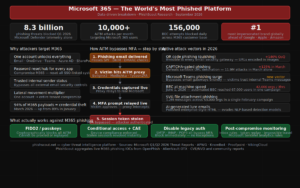
If you want to understand modern phishing, start with one number: 8.3 billion.
That is how many email-based phishing threats Microsoft Defender for Office 365 blocked in Q1 2026 alone; across just three months, across just one platform’s telemetry. The actual global phishing volume is multiples higher. And at the centre of virtually every significant credential phishing campaign targeting enterprise organisations sits the same target: Microsoft 365.
Microsoft is the most impersonated brand in phishing campaigns worldwide. Microsoft 365 credentials are the most sought-after prize in the criminal phishing ecosystem. And the infrastructure that attackers have built specifically to compromise M365 accounts has become so sophisticated, so widely available, and so effective that it has fundamentally changed what enterprise phishing defence needs to look like.
This article explains why Microsoft 365 dominates phishing targeting and what it means for every organisation running it.
The Numbers That Define the Problem
The scale of Microsoft 365 phishing is almost difficult to comprehend:
Microsoft detected 8.3 billion email-based phishing threats in Q1 2026, with link-based attacks accounting for 78% of all email threats during the quarter. Credential phishing dominated payload-based attacks, rising from 89% of payloads in January to 94% by March — meaning almost every phishing payload observed in Microsoft’s telemetry by end of Q1 was designed to steal login credentials, not deliver malware.
Microsoft alone reported over 10,000 adversary-in-the-middle (AiTM) attacks per month targeting its users. Microsoft 365 services block approximately 156,000 business email compromise attempts per day across the customer base. BEC volume targeting M365 grew 38% year-over-year.
In a single three-hour window on June 1, 2026, a BEC campaign reached more than 67,000 users across more than 42,000 organisations almost exclusively in the United States. A single HTML phishing campaign on March 17, 2026 delivered more than 1.5 million confirmed malicious messages to 179,000 organisations across 43 countries — accounting for 7% of all malicious HTML attachments observed that month.
These are not aggregate phishing statistics. These are Microsoft 365-specific numbers, from Microsoft’s own telemetry, from the first six months of 2026. The targeting is not random. It is deliberate, systematic, and industrialised.
Why Microsoft 365 Specifically?
Understanding why M365 dominates phishing targeting requires understanding what a single compromised account actually gives an attacker.
One Key, Every Door
A Microsoft 365 account is not just an email address. A single set of M365 credentials unlocks:
Email: Outlook, including the ability to read every email the victim has ever sent or received, monitor ongoing conversations, and send emails as a trusted internal sender.
Files: OneDrive and SharePoint, typically containing financial documents, legal contracts, personal data, product roadmaps, and anything else the organisation stores in the cloud.
Collaboration: Microsoft Teams, where increasingly sensitive business conversations take place — often less guarded than email because employees perceive Teams as more informal and internal.
Identity: Azure Active Directory / Entra ID, which controls access to every application in the organisation’s Microsoft ecosystem, and increasingly every third-party application integrated with SSO.
Devices: Microsoft Intune and Endpoint Manager, giving visibility into device compliance and management configurations.
Business applications: Dynamics 365, Power Platform, and any third-party application integrated with the M365 tenant.
A compromised M365 account is not a compromised email inbox. It is a compromised organisational identity with lateral movement potential across every system the organisation uses.
The Lateral Movement Multiplier
What makes M365 credential theft uniquely valuable is the lateral movement it enables. A compromised account belonging to an accounts payable clerk gives an attacker access to finance email threads. A compromised IT administrator account gives access to Azure AD, from which global administrator privileges can potentially be escalated. A compromised executive account gives access to board-level communications and the authority to approve requests that would never be approved from an unknown sender.
A single compromised Microsoft 365 account provides an attacker with the credibility of a legitimate internal sender, making downstream BEC and lateral movement significantly easier. The attacker does not need to compromise ten accounts. They need to compromise one — and then use it to compromise everything else.
The Password Reset Attack Surface
Microsoft 365 also sits at the centre of organisational password reset infrastructure. When an employee forgets their password for their CRM, their HR system, their payroll platform, or any other application — the reset email goes to their M365 inbox. An attacker with access to an M365 account can therefore reset passwords for every other system the victim uses, turning a single credential theft into complete organisational account takeover.
The Attack Infrastructure Built Specifically for M365
The criminal ecosystem has invested heavily in tooling specifically designed to compromise Microsoft 365 accounts at scale. This tooling has become so sophisticated and so widely available that it has democratised enterprise-level credential phishing.
Phishing-as-a-Service Kits
Industrialised phishing kits targeting Microsoft 365 are available on criminal forums for as little as $50-$200 per month. These kits include:
- Convincing HTML replicas of the Microsoft 365 login page, updated regularly to match Microsoft’s current UI
- Automated credential exfiltration to attacker-controlled channels (Telegram bots are popular)
- Real-time notifications when a victim enters credentials
- Automatic redirection to the legitimate Microsoft login page after credential capture to reduce victim suspicion
- Built-in evasion techniques including CAPTCHA pages, geolocation filtering, and device fingerprinting to defeat automated security scanning
Tycoon2FA, one of the most prevalent Microsoft-targeting PhaaS platforms, accounted for over 75% of CAPTCHA-gated phishing in late 2025 before its market share declined to 41% by March 2026 as competing platforms gained ground. The decline in Tycoon2FA’s share does not represent a reduction in attacks — it represents a diversification of the PhaaS market, with multiple competing platforms offering comparable capabilities.
AiTM Toolkits — Bypassing MFA at Scale
The most significant development in Microsoft 365-targeting phishing is the widespread deployment of Adversary-in-the-Middle toolkits — most prominently Evilginx3, Modlishka, and Muraena.
These tools operate as reverse proxies between the victim and Microsoft’s genuine login infrastructure. When a victim visits an AiTM phishing page:
- The victim enters their Microsoft credentials — which the proxy captures
- The proxy relays the credentials to the real Microsoft login page
- Microsoft prompts for MFA — the proxy relays this to the victim
- The victim approves MFA — the proxy relays this to Microsoft
- Microsoft issues a session cookie — the proxy intercepts and steals it
- The attacker now has an authenticated session that bypasses MFA entirely
Microsoft alone reported over 10,000 AiTM attacks per month targeting its users. The AiTM toolkit ecosystem has made MFA bypass a commodity capability — available to any attacker willing to pay a monthly subscription fee.
A notable campaign between April 14 and 16, 2026 targeted more than 35,000 users across more than 13,000 organisations in 26 countries, with 92% of targets in the US. The lures used polished, enterprise-style HTML templates with structured layouts and preemptive authenticity statements — AI-generated content that made the phishing emails appear more credible than typical campaigns.
Microsoft Teams as an Attack Vector
The Q2 2026 Microsoft threat landscape report specifically warned of a surge in Microsoft Teams phishing, which can evade email security filters entirely. Attackers with access to compromised M365 accounts — or using external access features — send phishing links through Teams chats and channels. Because Teams messages arrive through a different channel than email, they bypass email security gateways completely. Employees are also conditioned to trust Teams as an internal communication tool, increasing click-through rates.
The 2026 Attack Taxonomy — How M365 Phishing Actually Works
Understanding how attackers operationalise M365 phishing requires looking at the complete attack chain, not just the phishing email.
Stage 1 — Initial delivery
The phishing email arrives. Common lures in 2026 include:
- Shared document notifications (“John Smith shared a file with you”)
- Microsoft 365 security alerts (“Unusual sign-in activity detected”)
- IT department password expiry notices
- HR communications (payroll updates, benefits enrolment)
- External collaboration invitations
- Microsoft Teams meeting invitations with embedded phishing links
Stage 2 — Evasion
Before reaching the victim’s inbox, the phishing email passes through several security layers. Modern M365-targeting campaigns are engineered specifically to evade each:
- HTML smuggling to hide malicious content from email scanners
- QR codes embedding phishing URLs invisible to URL reputation engines
- CAPTCHA gates that prevent automated sandbox detonation
- Legitimate URL redirectors (Google, Microsoft’s own safelinks) to mask the final destination
- SVG file attachments containing embedded phishing content
CAPTCHA-gated phishing surged 125% in March 2026 to 11.9 million attacks, reaching the highest monthly volume in a year — a direct response to sandbox-based email security becoming more prevalent.
Stage 3 — Credential capture
The victim reaches a convincing Microsoft 365 login page. AiTM setups relay the authentication in real time, capturing credentials and session tokens simultaneously. Non-AiTM campaigns capture credentials and use them immediately before the victim changes their password.
Stage 4 — Post-compromise
Once inside an M365 tenant, attackers typically:
- Set up inbox rules to forward all incoming email to an external address and delete forwarded copies from the victim’s inbox — creating an invisible monitoring capability
- Search the inbox for sensitive keywords: “invoice”, “payment”, “bank”, “transfer”, “password”, “contract”
- Monitor ongoing email threads for payment opportunities to intercept
- Access SharePoint and OneDrive for sensitive documents
- Use the compromised account to send internal phishing emails — which bypass all external email security controls because they originate from a trusted internal address
- Attempt to register new MFA devices or OAuth applications to maintain persistent access
Why Standard Defences Are Not Enough
The sophistication of M365-targeting phishing has outpaced the defences that most organisations have deployed.
Why DMARC alone is insufficient: DMARC prevents your domain from being spoofed in delivered email. It does not prevent attackers from registering lookalike domains, compromising legitimate internal accounts, or using legitimate Microsoft infrastructure to send phishing.
Why MFA alone is insufficient: AiTM attacks bypass TOTP-based and push-notification MFA entirely. Over 10,000 AiTM attacks per month targeting Microsoft users confirm this is not a theoretical vulnerability — it is an actively exploited gap at industrial scale. 89% of security professionals still believe MFA provides complete protection — a dangerous misconception.
Why email security gateways alone are insufficient: QR code phishing, SVG attachments, CAPTCHA gates, HTML smuggling, and legitimate URL redirectors are all specifically designed to evade email security scanning. The Q1 2026 data shows these techniques growing rapidly precisely because they are defeating deployed gateway controls.
What Effective M365 Defence Looks Like in 2026
Defending Microsoft 365 against the current threat landscape requires layered controls that address each stage of the attack chain.
Phishing-resistant MFA — the single most impactful control
Replace TOTP authenticators and push notifications with FIDO2 hardware keys or Microsoft’s Certificate-Based Authentication for all privileged accounts. FIDO2 authentication is cryptographically bound to the specific origin domain — an AiTM proxy operating on a different domain cannot complete FIDO2 authentication regardless of how convincing the phishing page is.
Microsoft Entra ID supports FIDO2 and passkeys natively. Deployment should begin with privileged accounts (global administrators, finance team, executives) and expand to all users.
Conditional Access policies
Configure Conditional Access to require compliant, Intune-managed devices for all M365 access. A stolen session cookie used from an unmanaged attacker device will be blocked by a policy requiring device compliance. Key policies to implement:
- Require compliant device for all cloud application access
- Block legacy authentication protocols (SMTP, IMAP, POP — all bypass MFA)
- Require MFA for all users with no exceptions
- Block sign-ins from high-risk locations or anonymous proxies
- Implement sign-in risk and user risk policies through Entra ID Protection
Continuous Access Evaluation
Enable Continuous Access Evaluation (CAE) in Microsoft Entra ID. CAE forces real-time re-evaluation of access conditions, meaning a revoked session token is blocked immediately rather than remaining valid until its expiry time — which can be hours or days for standard Microsoft tokens.
Reduce session token lifetime
Default Microsoft 365 session tokens can persist for up to 90 days. For privileged accounts and high-risk roles, reduce the session lifetime significantly through Conditional Access token lifetime policies.
Monitor for post-compromise indicators
Detection must extend beyond the inbox. Key indicators of M365 compromise to monitor:
- New inbox rules created — particularly rules that forward, delete, or mark as read
- New OAuth application registrations or MFA device additions
- Impossible travel — authentication from geographically inconsistent locations
- Unusual SharePoint or OneDrive access patterns
- Email sent to external recipients the account has never contacted
- Large volumes of email search activity (attackers searching for sensitive content)
- Sign-ins from new ASNs or IP addresses not in the user’s history
Microsoft Sentinel has built-in analytics rules for most of these patterns. Ensure they are enabled and routed to your security operations team.
Disable legacy authentication
Legacy authentication protocols — SMTP AUTH, IMAP, POP3, basic authentication — bypass all modern MFA controls. Microsoft has been progressively disabling these, but organisations with custom applications or older email clients may still have them enabled. Audit and disable immediately.
Sigma Detection — M365 Post-Compromise Inbox Rule Creation
title: Suspicious M365 Inbox Rule Created Post Authentication
id: 7a2b3c4d-5e6f-7890-abcd-ef1234567890
status: experimental
description: Detects creation of inbox forwarding or deletion rules following
             recent authentication from new IP — potential post-compromise activity
logsource:
    product: microsoft365
    service: exchange
detection:
    selection:
        Operation: "New-InboxRule"
        Parameters|contains:
            - "ForwardTo"
            - "ForwardAsAttachmentTo"
            - "DeleteMessage"
            - "MarkAsRead"
    condition: selection
falsepositives:
    - Legitimate user inbox rule configuration
    - IT-administered rules
level: medium
tags:
    - attack.persistence
    - attack.t1098
    - attack.collection
    - attack.t1114
Conclusion
Microsoft 365 is the most phished platform on Earth because it is the most valuable. A single compromised account unlocks email, files, identity, and the ability to impersonate a trusted internal sender. The criminal ecosystem has responded to this value with industrialised, sophisticated tooling — PhaaS kits, AiTM proxies, Teams-based delivery, CAPTCHA evasion — that has outpaced the defences most organisations have deployed.
The 8.3 billion phishing threats blocked by Microsoft in Q1 2026 are the attacks that were caught. The attacks that weren’t caught are the ones that matter.
Defending M365 in 2026 requires phishing-resistant MFA, Conditional Access enforcement, post-compromise monitoring, and the recognition that email security gateways — however sophisticated — are not sufficient against an attack ecosystem that has specifically engineered itself to bypass them.
PhishScout tracks live Microsoft 365 phishing campaigns and publishes IOCs from active campaigns at phishscout.net